Report Win-Ticket
written by Fwen
Back to OverviewA Step by Step Guide to Report a Win-Ticket in Discord
When you want to sign up for our tournament, one of the requirements will be the use of the add-on: PetMastersLeagueLogs. So, install this addon first, and remind yourself to keep it up to date as well. You can download it here - CurseForge
Another requirement is that you also have Discord installed. This is so you can contact your opponent, and be in voice-chat when you do your match. You can use our invite link to join our Discord server - Join Our Discord
The last requirement is that you need to make sure your match gets recorded, this means that either you, your opponent, or someone else will need to record your match ingame, and the Pet Draft also needs to be recorded. This is needed to validate the match. Are you or your opponent not able to record the match? Or is there no one who can record it? Then please reschedule your match, do not play it and not record it.
A short explanation about the add-on
This add-on is specifically made for the Pet Masters League tournaments, but can also be used for when the player wants to keep track on their PVP pet battles. It is a light weight add-on that only logs PVP pet battles, not PVE battles. This addon logs each battle the players have played as well as the pet usage from both players in the battles.
The add-on is required because it is our source of truth for the results of each match, and we use it for statistics as well. While players also can ask the staff for recording the match, or stream their match on YouTube/Twitch/Discord, the add-on is still required to use, and to report the match with.
How to use the addon?
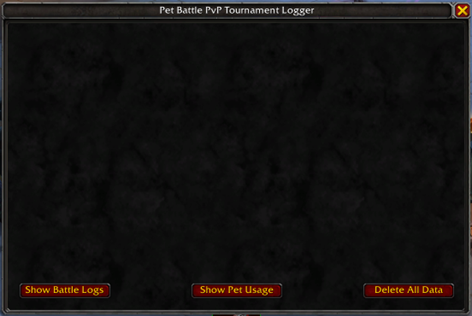
After you have installed the addon via CurseForge or WowUp, you can start using it. When you log in on your character, you can then use the slash command - /pml - to open the addon frame.
On the first time opening the addon, you will not be able to see any Battle Logs, so you can click on any of the buttons, it will not show anything. To see battle logs, you will need to do a PvP battle first.
NOTE - the addon only logs PvP battles, it does not log PvE battles.
Upon logging in with your character, there will be a message from the addon to tell you it has been initialized, and how many logs are saved. So, keep an eye on the chat as well for more information about what the addon has done, or is doing.
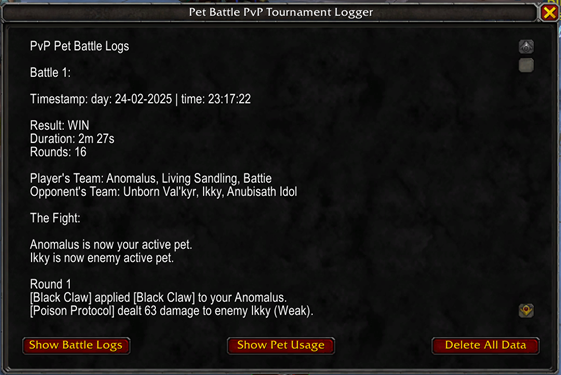
When you have done a PvP battle, you can check out the battle logs and pet usage in the addon. In the chat you can see the addon messages for when you start a PvP battle, when it ends, and how many battle logs are saved.

Open the addon with the slash command, then you can click on the buttons Show Battle Logs and Show Pet Usage, when clicking on the buttons you will see the logs appearing in text format. You can scroll through the logs as well if you want.
How to report a match?
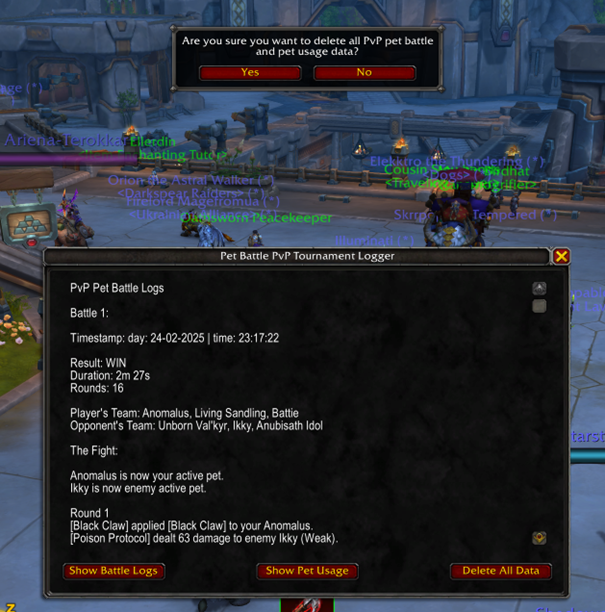
!! NOTE - Before you start your match, make sure you delete all the data in the addon - for this you open the addon, and click on the Delete All Data button, then click Yes to confirm to delete all the data.
When you have played your match, and you made sure that the battles are logged, and that the battles and the pet draft are recorded as well - you or your opponent will need to report the match result.
!! NOTE - only one of you need to create a win-ticket. Please, make sure only one ticket is created, not two, because that will be confusing for the staff who will validate the match!
How to create a win-ticket?
In the Discord server, you will see several sections with chat channels. In the section !! IMPORTANT !! you will see the channel #tickets.
To report a win-ticket, you will need to click on the button - Win Reporting - this will create a new channel in the section Tickets, and will look like this: #win-<ticket-number> (for example: #win-0010). This is the channel in where you need to report the match result. The staff will add the other player to the win-ticket after it is created!
What first to report in the Win-Ticket?
The first thing that you need to write down in the win-ticket, is the match result, the score and who has won the match.
You can do this in the following ways:
I won against Flip with 3-0
Fwen won from Flip with 3-0
Fwen vs Flip, Fwen won with 3-0
These are just examples, so you can write it down the way you want, but be clear about it, you have to write down your opponent's name at least, and what the score is, this to avoid the staff from asking questions.
What to report next?
The second thing you have to report are the battle logs from the addon in the game. This is the most important thing! Without the logs, the match will not be validated!
You can simply do this by opening the addon, clicking on the Battle Logs button, you can click on the Select All button to select all the text, and then copy the text with CTRL + C, but you can also select all the text with CTRL + A when you have clicked on the text, if you find this easier, and then copy the text.
When you have copied the battle logs, you go back to the win-ticket channel you have opened, here you can just paste the battle logs, you can do this with CTRL + V. You will see that Discord will automatically turn the battle logs into a .txt file.
!! NOTE - please do NOT save the logs in a Word document or a PDF file, we want them in a text (.txt) file!
You do not have to save them first on your computer, just directly paste them in the win-ticket channel. If you do want to save them on your computer, just send your message, and then you can download the text file from the channel, this will save your battle logs on your computer in a text file.
!! Battle Pet Custom Names !!
If your pets have custom names, you have to add a list with the custom pet names linked to the original pet names. This is asked because your custom pet names will be set automatically in the combat logs, and the pet statistics also looks at the combat logs, and will see the custom pet names as if they are different pets, this will mess up the statistics in total, and so Fwen has to edit the combat logs when custom pet names are used.
Please! Add this list to the win-ticket, this is for both players! You can set the list like this (as example):
Fwen's custom pet names:
Ippy - Mechanical Pandaren Dragonling
Alf - Shimmerbough Hoarder
etc...
!! Very Important Note !!
When you have forgotten to delete all the data before your match starts, do not worry about it, just report the battle logs like above - just write a message in the win-ticket channel, or let Fwen know that you forgot to delete old battle logs - IN ALL CASES! You do NOT EDIT the logs yourself! Fwen will do this for you, and she will post the edited logs in the win-ticket channel as well when she has done the editing.
Is there more to report?
Yes! There is one more thing you have to report - the recording from the match.
You can report the recording in the following ways:
If you have been streaming on Twitch, you will send the link to the video in the win-ticket.
If you have recorded the match on your computer, you can upload the recording to something like YouTube, you then have to send the link to the video in the win-ticket.
If you have uploaded the recording to your Google Drive, you have to make sure the staff has permissions to download the video from your Google Drive.
These ways also count for when your opponent has done the recording instead of you, he or she will then have to send the recording in the win-ticket channel, or send it to a staff member.
!! NOTE - when you have created the win-ticket channel, your opponent will not be added to the channel, it would be nice if you add your opponent to the win-ticket channel, so they can send their recording to the channel - if you cannot do this, a staff member will do it for you.
If the recording has been done by one of the staff members, you have to write this down in the win-ticket channel.
You can write this in the following example ways:
Match is recorded by Fwen
Match has been streamed on Twitch by Des
The staff member with the recording will then write a message with either the link to the video or that the recording has been uploaded to our Google Drive.
DO NOT FORGET!!
When you have done everything right, you are done, and you can relax, the tournament owner will check the logs and the recording, and will then validate the result. Would something be wrong, he will let you know.
You can now safely delete all the data from the addon, you really have to remember to do this before your next tournament match starts!
If you have questions, please do not hesitate to ask them in Discord, we are all there for you.